Admin Columns Pro - WooCommerce Addon
- Type
- Plugin
- Category
- WooCommerce Plugins
- Licence
- GNU GPL
- Delivery
- Instant download
- Access
- 12 months, or lifetime
- Sites
- Unlimited
Upgrade WooCommerce with our handy tools!
The best Product and Order management tool for WooCommerce
Save time managing your Products
Take control over your products with all the tools you need for an up-to-date inventory. Increase sales by shortening your time to market and increasing your flexibility.
- Display all the information you need
- Quick search/filter products
- Save custom product overviews
- Quick update & Bulk update
- Price update wizard
- Product sale wizard
Efficient Order Management
We know how it goes: the more orders you have, the harder it gets to manage them. Let’s make it a whole lot easier!
- Smart filter orders
- Bulk & Quick Edit orders
- Export orders
- Customize orders dashboard
Customer Management & Insights
Everything about your customers in a single place. Making it easy for you and your team to find, filter and make updates to your customers. Start managing them with ease!
- Display customer data you actually need
- Find customers
- Make quick changes to customers
- ..or make changes in bulk
- Export customers
Better Product Management for WooCommerce
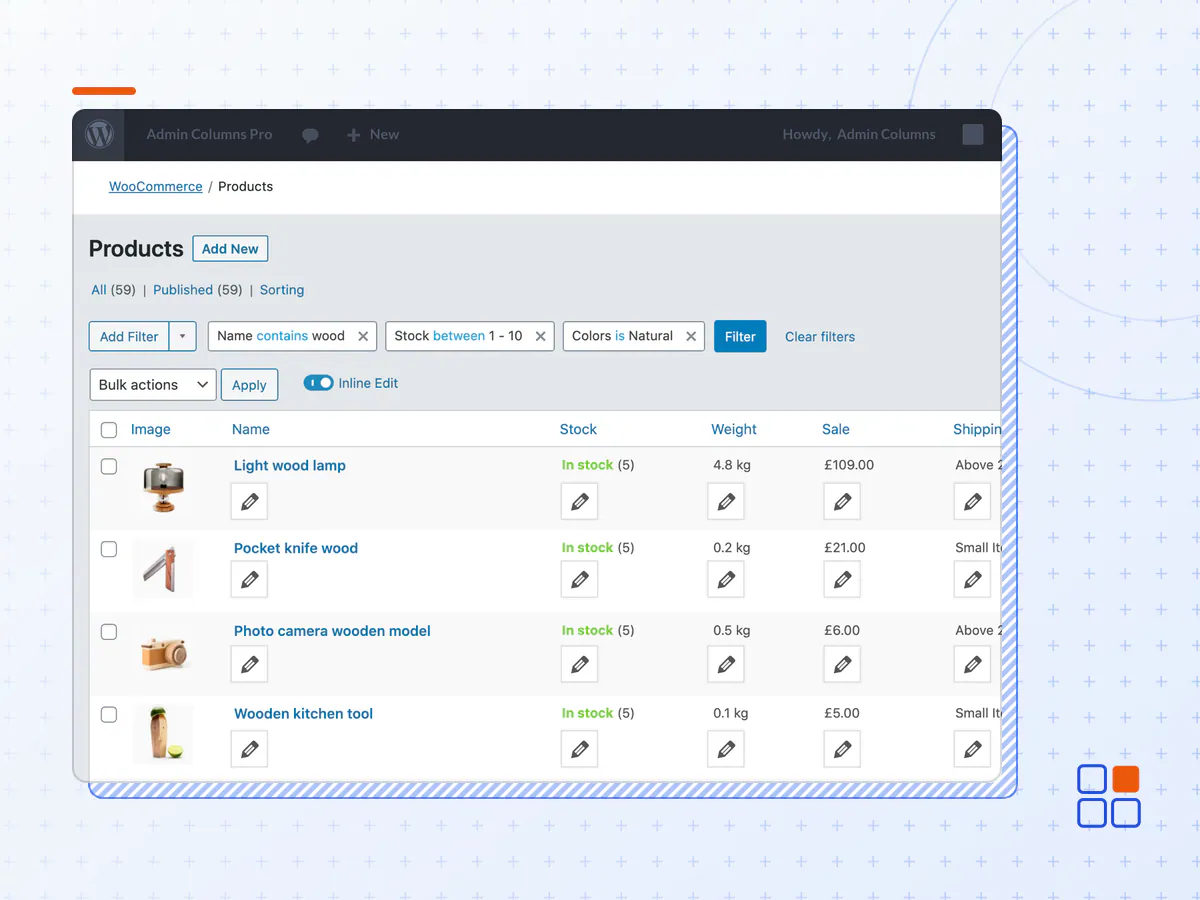
Find & Filter Products
Keep a clear sight of the updates your products need and prevent getting lost. The more products you add the harder it get’s to keep things organized. Let us lend you a hand.
- Filter products on any property
- Save filtered segments
- Sort products
- Set sorting and filter defaults
- Share filtered segment with other users
Quick & Bulk edit products
Update your content quickly using our Inline Edit feature, work directly from the product overview. No need to open individual product pages.
Want to update in bulk? Select the relevant product(s) and attribute(s) that require an update. Update the values and save. Combined with filtering your can easily select the set of records that require an update.
- No record limit
- Product properties & attributes
- Custom data fields
- Product variations
Price Update Wizard
Update your prices in the blink of an eye with the pricing wizard.
Combined with filtering you easily select the products that require an update.
- Increase, Decrease, Set new
- Update based on a percentage or a fixed value
- Optional rounding
Sale Wizard
Got a sale coming up use the Sale Wizard for quick sale configuration.
- Set sale prices based on regular prices or new prices
- Update prices based on a percentage or a fixed value
- Optional Decimals rounding
- Optional Sale scheduling
Got an active sale that’s running out of control? Easily clear all Sale prices to end your sale.
Customize Products Dashboard
With the Admin Columns WooCommerce add-on, you have all the crucial information at hand.
- Display ‘Product attributes’, ‘Stock status’, or any (product) information to your overview
- Hide unused product information, like ‘Featured’ or ‘Date’ to keep your overview clear
- Change the column width
- Hide default WordPress clutter you don’t need
You get the keys to start working with WooCommerce the way you want. Are you selling digital products? Hide the product information related to physical products.
Create multiple overviews
You probably have your own workflow for how you manage your products. Save your column sets tailored to your need/task.
E.g. Adding products requires different columns than handling your stock or improving your SEO.
Save your filters for easy access to your products for example: “High turnover products”, “Low on stock”, “Discounted” or “No image”. Got your personal filters, no problem filters can be public or private.
Efficient Order Management for WooCommerce
Filter & Segment Orders
The perfect orders dashboard. Find orders quick and easy!
- Filter orders on any property
- Save filtered segments
- Sort orders
- Set sorting and filter defaults
- Share filtered segment with other users
Easily Process Orders
Easily handle your orders from a single overview, with easy access to your order notes.
Available soon.
- Direct insight in your latest note
- Easily update your notes
- Filter on relevant notes
Better Customer Insights for WooCommerce
Export Customers to CSV
The reason to export customers is usually the need to import them into other software that is not connected with WordPress. Instantly export your data in CSV. CSV (Comma-separated values) is one of the most well-supported ways to export data. Slice and dice your data by filtering your data before exporting.
Quick and Bulk edit customers
Easily update your customer attributes to make sure that your customer base is up-to-date. Whether you make your changes in bulk or with the inline editor you will save yourself a lot of time.
- The Admin Columns Pro plugin archive (.zip), exactly as the developer released it.
- Uploads straight from the WordPress dashboard — no FTP or extra tools needed.
- GPL licensing: install it on every site you manage, client sites included.
- A year of downloads and newer versions with a single purchase, or permanent access with the lifetime upgrade.
- Also unlocked by every membership plan, together with the rest of the plugin catalogue.
Not included
- A licence key from the developer — features that run on the developer's own servers (cloud services, vendor auto-updates, vendor support) may be unavailable.
How to install Admin Columns Pro
- 1Download Admin Columns Pro from Downloads in your account. Keep the file zipped.
- 2In your WordPress dashboard open Plugins → Add New Plugin and click Upload Plugin.
- 3Choose the .zip, click Install Now, then Activate.
- 4Open the Admin Columns Pro settings screen and configure it for your site.
- 5If a notice asks for a licence key you can dismiss it; the plugin itself runs without one.
To update later, download the newer version from your account and upload it the same way — WordPress offers to replace the installed copy and keeps your settings.
Is this the developer's original Admin Columns Pro file?
Yes. The archive is the release the developer published, with nothing added or removed. It is distributed under the GNU GPL, which is what allows WordPress GPL to offer it; you are buying the download and updates, not a licence key from the vendor.
Can I use Admin Columns Pro on client websites?
Yes. The GPL places no limit on the number of sites, so you can install it on your own projects and on sites you build for clients.
How do I get newer versions of Admin Columns Pro?
When a newer release reaches our catalogue it replaces the file in your account, and you can request one from this page if you need it sooner. A single purchase covers a year of downloads (or longer with the lifetime upgrade); a membership covers updates while it is active.
Does it come with support from the developer?
No — vendor support is tied to a licence bought from the developer. We help with downloading and installing the file, and if it turns out to be broken you can ask for a refund within 14 days.