YITH WooCommerce Order & Shipment Tracking Premium
- Type
- Plugin
- Licence
- GNU GPL
- Delivery
- Instant download
- Access
- 12 months, or lifetime
- Sites
- Unlimited
What the plugin does
Allows your customers to easily track the shipping of orders placed in e-commerce.
How you can benefit from it:
- add, edit or import the order tracking number, the carrier name, and the tracking URL of every order placed in your shop;
- improve user experience in your shop by offering an easy way to track orders and shipments to customers that placed orders;
- include the tracking info in the order emails sent to the customers and on their My Account page;
- reduce the workload of your customer service by offering an automatic tracking of orders to decrease the number of phone calls or emails related to the status of the orders.
Allow orders and shipping tracking to build trust with your customers
Offering a positive buying experience should be the main goal of any e-commerce. Yet, the buying experience doesn’t end when the customer adds the product to the cart and pays for it; on the contrary, it’s just after paying that the user will start feeling vulnerable and wondering if your shop is reliable, trustworthy and if the product will be shipped for real, with which carrier, when will it be delivered, and what are the steps to follow in the case of a late delivery or no delivery at all.
Usability research revealed that 97% of customers expect to be able to monitor every step of the shipping process for the products they have purchased online.
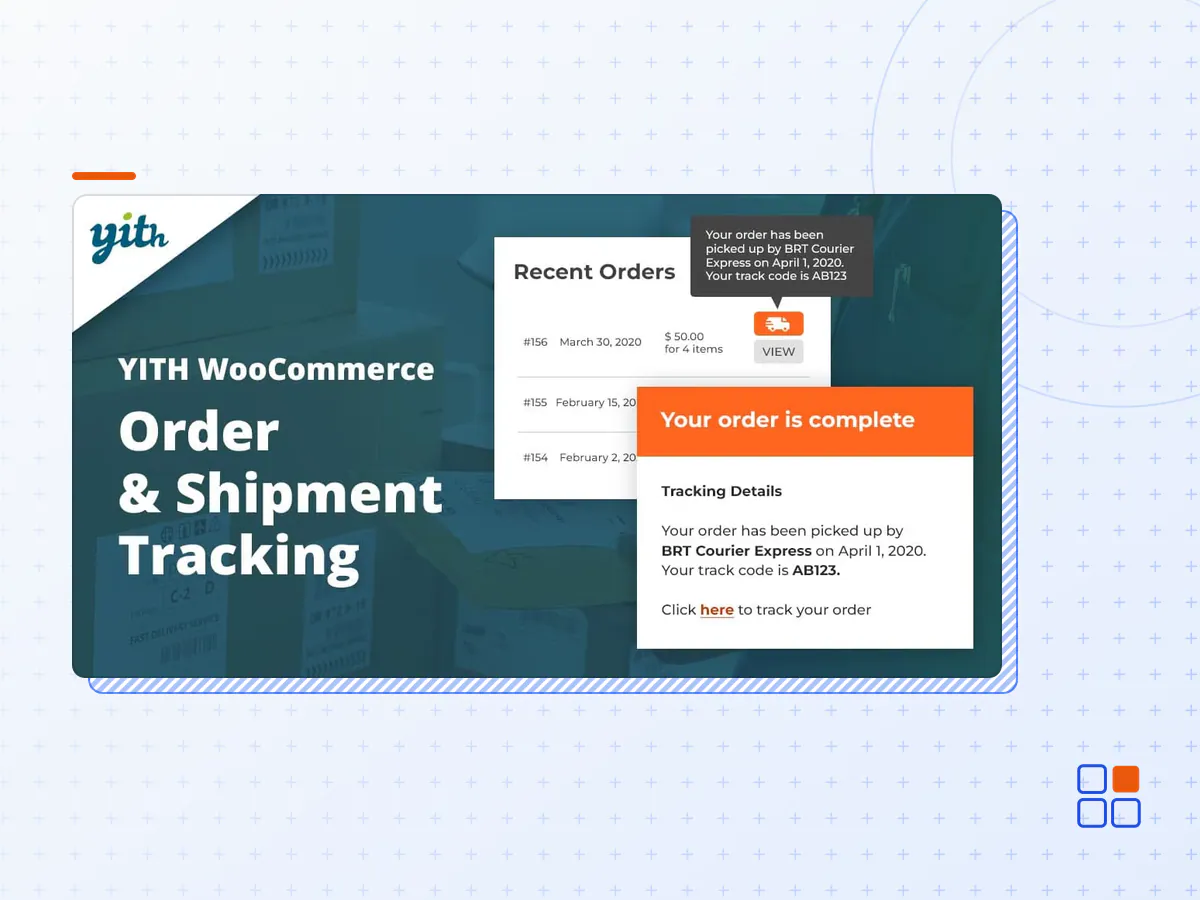
YITH WooCommerce Order & Shipment Tracking allows inserting shipping information (carrier’s name, delivery date, tracking code, carrier’s site URL to track the order in real-time, etc.) into every order and showing the same data on your customers’ accounts (both in the orders list and order details) and in the orders’ emails.
Giving customers a tool to observe the whole delivery of the product with a single click will simplify the entire sale process, will help you build trust with them, and will reduce the workload of your customer support.
Choose the carriers in charge of your shipping from a list of over 480 supported services
The plugin supports 489 carriers; you only need to select the ones provided and the tracking links will be automatically generated. You can’t find your carrier on the list? Don’t worry! Give us a heads-up and we will add it in a plugin update as soon as possible.
Insert the tracking data in the order
The plugin is very easy to use. Once installed, you just need to open the order and insert the tracking data in the related panel. You can also import tracking data through a CSV file.
Show the tracking data to users by inserting it in the order details
After inserting the tracking data in the order, you can customize the text through the editor and show it on the customer’s account, in the orders list (as a tooltip), and in the order details.
Show the tracking data to the user by inserting it in the order emails
Tracking data can also be inserted into the order emails sent to the customers. You can customize the text and choose whether to show it before or after the product list.
Create an order tracking page using the shortcode
Do you want to offer an extra service to your customers? Create an order tracking page with the shortcode included in the plugin and allow them to view the shipping status by inserting their email and order ID.
Insert the tracking data into the packing slips
Thanks to the integration with YITH WooCommerce PDF Invoices & Packing Slips, you can insert the order tracking data into the packing slips generated by this plugin.
- The YITH WooCommerce Order & Shipment Tracking plugin archive (.zip), exactly as the developer released it.
- Uploads straight from the WordPress dashboard — no FTP or extra tools needed.
- GPL licensing: install it on every site you manage, client sites included.
- A year of downloads and newer versions with a single purchase, or permanent access with the lifetime upgrade.
- Also unlocked by every membership plan, together with the rest of the plugin catalogue.
Not included
- A licence key from the developer — features that run on the developer's own servers (cloud services, vendor auto-updates, vendor support) may be unavailable.
How to install YITH WooCommerce Order & Shipment Tracking
- 1Download YITH WooCommerce Order & Shipment Tracking from Downloads in your account. Keep the file zipped.
- 2In your WordPress dashboard open Plugins → Add New Plugin and click Upload Plugin.
- 3Choose the .zip, click Install Now, then Activate.
- 4Open the YITH WooCommerce Order & Shipment Tracking settings screen and configure it for your site.
- 5If a notice asks for a licence key you can dismiss it; the plugin itself runs without one.
To update later, download the newer version from your account and upload it the same way — WordPress offers to replace the installed copy and keeps your settings.
Is this the developer's original YITH WooCommerce Order & Shipment Tracking file?
Yes. The archive is the release the developer published, with nothing added or removed. It is distributed under the GNU GPL, which is what allows WordPress GPL to offer it; you are buying the download and updates, not a licence key from the vendor.
Can I use YITH WooCommerce Order & Shipment Tracking on client websites?
Yes. The GPL places no limit on the number of sites, so you can install it on your own projects and on sites you build for clients.
How do I get newer versions of YITH WooCommerce Order & Shipment Tracking?
When a newer release reaches our catalogue it replaces the file in your account, and you can request one from this page if you need it sooner. A single purchase covers a year of downloads (or longer with the lifetime upgrade); a membership covers updates while it is active.
Does it come with support from the developer?
No — vendor support is tied to a licence bought from the developer. We help with downloading and installing the file, and if it turns out to be broken you can ask for a refund within 14 days.