YITH WooCommerce Customize My Account Page Premium
- Type
- Plugin
- Licence
- GNU GPL
- Delivery
- Instant download
- Access
- 12 months, or lifetime
- Sites
- Unlimited
What the plugin does
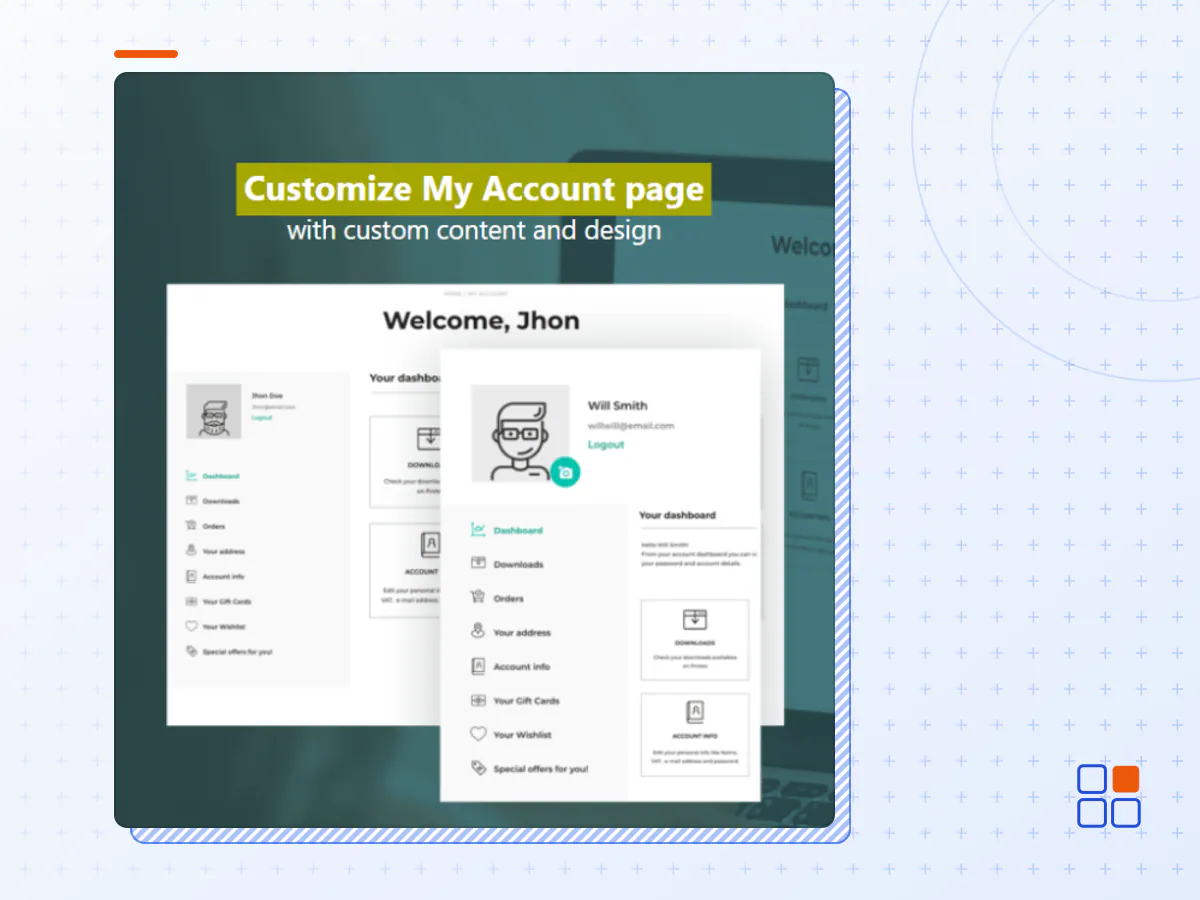
Customize the My Account page of your customers by creating custom sections with promotions and ad-hoc content based on your needs.
How you can benefit from it:
- Add an unlimited number of menu entries in the My Account page, visible to your users, and choose what the content will be: instructions, coupons, surveys, downloadable files, video tutorials, news, notifications etc…
- Promote products and show messages related to promotions and discount codes right from the My Account page, one of the most visited areas of your website;
- Create sections with reserved contents that are visible to specific user roles only;
- Choose and customize the layout of the My Account page so to make it more usable and modern;
- Edit label, content, and position of the default WooCommerce sections (Dashboard, Orders, etc.)
- Let users load their own custom profile avatar.
A powerful tool to use the My Account page as a marketing tool and improve the customer experience
My Account page is one of the most visited sections of an e-commerce site. Users access their profile section on a regular basis to monitor orders, edit their personal information and payment methods, and so on.
For this reason, it is essential to both offer a usable area – that is built so that users can easily find the information they’re looking for – and to take advantage of this section by adding custom contents, promotions, and information that can help you loyalize your users and push them to buy.
YITH WooCommerce Customize My Account Page allows you to edit the default WooCommerce sections and to add custom sections where you can add any kind of content: texts, images, videos, downloadable files, discount codes, etc. You will be able to promote special offers, products and choose whether to show the contents to all users or only to those with a certain role.
If you want to strengthen the My Account page and get the best out of it, our plugin is the solution you’ve been looking for.
Choose the layout of the My Account page
Horizontal or vertical menu? Modern, classic, or minimal style? Choose the position of the menu (vertical, on the right, on the left, or horizontal) and which design suits your shop best. Customize colors, spacing, and icons and make it perfect for your design requirements.
Edit the default WooCommerce endpoints
Do you want to edit the text or the order of WooCommerce endpoints? Add custom content into your users’ dashboards or add a custom icon next to the endpoint? This plugin is the only solution that allows you to apply any sort of modification to the endpoints without having to dive into the code of your website.
Create unlimited custom endpoints
Do you want to add a new page in My Account with assembling instructions and video tutorials? Create a page with FAQs, links to your policies, and Customer Care contact channels? Or maybe create a page to advertize a product or a service and encourage users to contact you? Create an unlimited number of endpoints and choose the contents to add in it through the visual editor.
Create groups of endpoints
Optimize the space and split contents into groups so as to make the structure and hierarchy of your contents clear and easy to use.
Use the banners to show dynamic content in the dashboard
Improve the UX by using the new banner functionality: create graphical sections to quickly access orders, account info, payment methods, and choose whether to show a badge notification with the total number of elements in it: number of orders, number of products in the wishlist (if you use our YITH Wishlist plugin), total points (if you use our YITH Points and Rewards plugin) and so on.
Create reserved areas for specific user roles or for members
Choose if one or more of your custom endpoints – and their content as well – will be visible to every user, only to specific user roles or, if you use our Membership plugin, only to members of a specific plan.
Set up a default avatar for your user and let them update it with their custom image
Load a default avatar for your users (create a unique one or one that matches the style of your shop!) and choose whether to enable or not the option to let them upload a custom avatar.
Add more links to the endpoints section
Add a link to redirect your users to the Shop page, to the on-sale products, or why not an external URL, like a dedicated landing page.
Block emails domains that are not allowed to register
Do you want to prevent some users with specific email domains from registering an account on your website? Create your own “blacklist” and keep control of the accounts created in your shop.
Add reCaptcha to the Register form
Increase your shop security by adding a reCaptcha option to your registration form.
Ask your customers to verify their accounts
Send a verification email to new users and ask them to click on the confirmation link in it to activate their account.
- The YITH WooCommerce Customize My Account Page plugin archive (.zip), exactly as the developer released it.
- Uploads straight from the WordPress dashboard — no FTP or extra tools needed.
- GPL licensing: install it on every site you manage, client sites included.
- A year of downloads and newer versions with a single purchase, or permanent access with the lifetime upgrade.
- Also unlocked by every membership plan, together with the rest of the plugin catalogue.
Not included
- A licence key from the developer — features that run on the developer's own servers (cloud services, vendor auto-updates, vendor support) may be unavailable.
How to install YITH WooCommerce Customize My Account Page
- 1Download YITH WooCommerce Customize My Account Page from Downloads in your account. Keep the file zipped.
- 2In your WordPress dashboard open Plugins → Add New Plugin and click Upload Plugin.
- 3Choose the .zip, click Install Now, then Activate.
- 4Open the YITH WooCommerce Customize My Account Page settings screen and configure it for your site.
- 5If a notice asks for a licence key you can dismiss it; the plugin itself runs without one.
To update later, download the newer version from your account and upload it the same way — WordPress offers to replace the installed copy and keeps your settings.
Is this the developer's original YITH WooCommerce Customize My Account Page file?
Yes. The archive is the release the developer published, with nothing added or removed. It is distributed under the GNU GPL, which is what allows WordPress GPL to offer it; you are buying the download and updates, not a licence key from the vendor.
Can I use YITH WooCommerce Customize My Account Page on client websites?
Yes. The GPL places no limit on the number of sites, so you can install it on your own projects and on sites you build for clients.
How do I get newer versions of YITH WooCommerce Customize My Account Page?
When a newer release reaches our catalogue it replaces the file in your account, and you can request one from this page if you need it sooner. A single purchase covers a year of downloads (or longer with the lifetime upgrade); a membership covers updates while it is active.
Does it come with support from the developer?
No — vendor support is tied to a licence bought from the developer. We help with downloading and installing the file, and if it turns out to be broken you can ask for a refund within 14 days.