Tabula - Art, Music & Language School WordPress Theme
- Type
- Theme
- Licence
- GNU GPL
- Delivery
- Instant download
- Access
- 12 months, or lifetime
- Sites
- Unlimited
Tabula – Art & Language School WordPress Theme
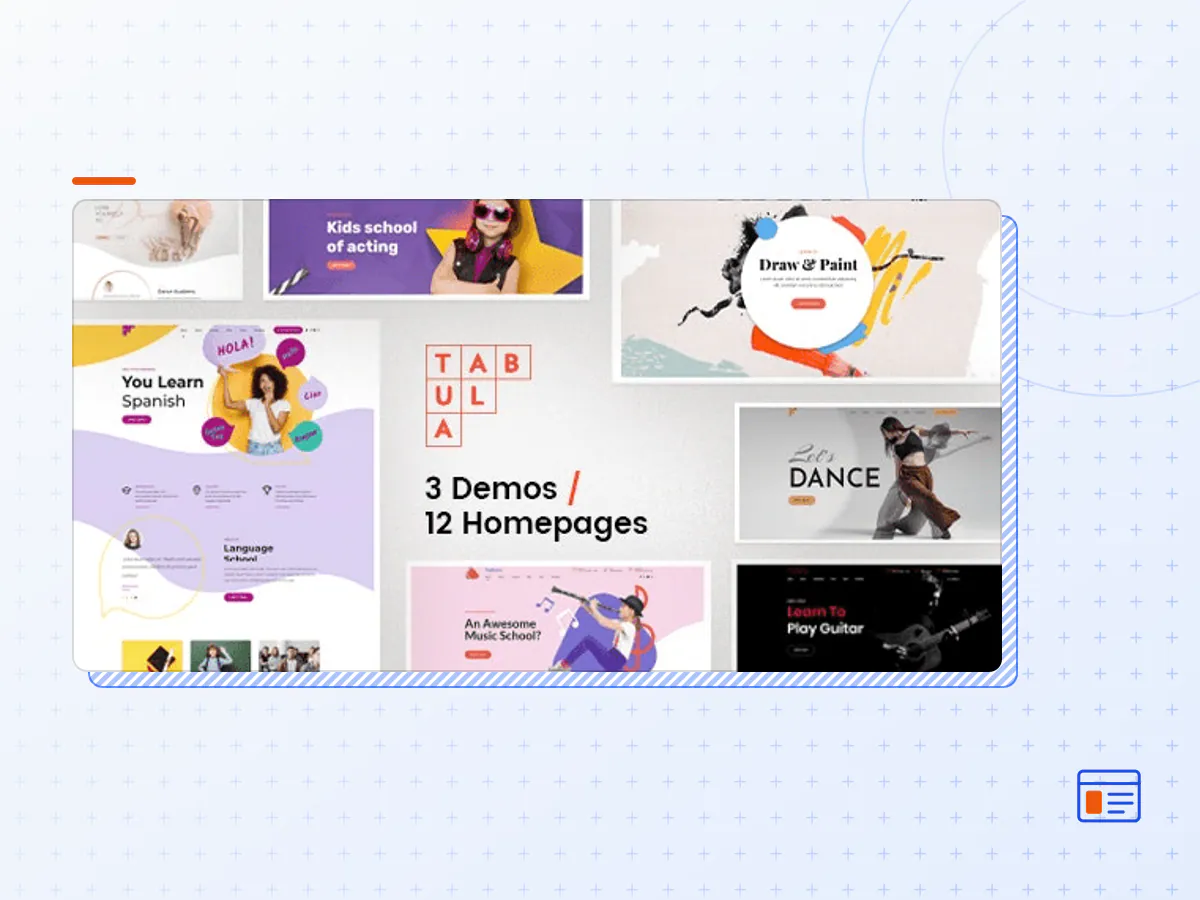
Tabula is a Multi-Purpose WordPress Theme for all kinds of education and teaching purposes such as language schools, art and music classes, acting or dance studios and other schools, academies or freelance teachers. This WP theme is built having in mind actual needs of of service providers in this segment and their clients. This WP theme features 3 demos and 12 homepages with distinctive design and carefully designed inner pages.
Tabula WordPress Theme for music, art and language schools is responsive and retina ready.
Tabula offers comprehensive options panel, unique page transitions and distinctive typography and highly rated customizable Cost Calculator plugin that comes free with this theme. It also includes easy to use and fast drag&drop Bold page builder.
With one-click demo content importer tool you will have a fully featured website. You can then start personalizing your WordPress website through the theme options control panel, and replacing the demo content with your own.
Tabula WordPress theme comes with free updates and free post-sales support by our highly rated support team.
From October 2023 our new “AI Content Generator” feature in Bold Builder utilizes artificial intelligence to automatically generate text based on input data, simplifying content creation for web design and development projects. It’s a valuable tool for producing accurate and relevant content efficiently.
Feature List
GENERAL
- Latest WordPress version compatibility
- Well organized & clean code
- WordPress Multisite tested
- Child theme ready
- Theme options powered by native WordPress Customizer
- Translation ready
- One page support
- Compatible browsers: IE11, Firefox, Safari, Opera, Chrome, Edge
- Responsive design
- Retina ready
- RTL|LTR support
- Online documentation
- 24/7 customer support
PLUGINS
Included:
- Bold Builder
- Bold Themes WordPress Importer (1 click demo import tool)
- Bold Themes’ Cost Calculator
Supported:
- Contact Form 7
- WPML
- WooCommerce
- W3 Total Cache
- Yoast
BACKEND EDITOR FEATURES
- Fast drag & drop backend editor
- Responsive options
- Full clipboard functionality with copy /paste from one page to another or from one website to another
- Time limited content appearance
- Hide/appear on screen resolutions option
- API included
- Full width/boxed layout options
- Multiple header (including sticky header) & menu styles
- Left and right sidebar option
- Custom footer
- Override global settings option (change settings for individual pages)
- Color schemes
- Define colors with color picker
- Parallax effect
- Smooth transition effects
- Icon widget (e.g. social icons)
- Button widget
- Custom icon sets
- Google Fonts
- Attractive headline fonts with dashes (circle, star, art dot, speech ballonn, guitar pick)
- SVG format logo supported
ELEMENTS
- Accordion & tabs
- Button
- Card with image
- Contact form 7
- Countdown
- Counter with/without icon
- Custom menu
- Event
- Floating image
- Google maps element
- Headline & text
- Icon
- Image & Image slider
- Instagram & Twitter element
- Latest posts element
- Masonry post & image grid
- Open Street maps element
- Organic animation
- Price list
- Progress bar
- Raw html/js content
- Schedule
- Separator
- Service element
- Slider element
- Steps line
- Video element
- The Tabula theme package as the developer released it.
- The installable theme .zip, plus whatever else the developer ships with it — often a child theme and documentation.
- GPL licensing: use it on as many sites as you like, for yourself or for clients.
- A year of downloads and newer versions with a single purchase, or permanent access with the lifetime upgrade.
- Also unlocked by every membership plan, together with the rest of the theme catalogue.
Not included
- A licence key from the developer — demo importers or bundled-plugin updates that check a key on the developer's servers may need manual steps.
How to install Tabula
- 1Download Tabula from Downloads in your account.
- 2If the download holds several files, unzip only that outer package and find the installable theme .zip (usually named after the theme).
- 3In WordPress open Appearance → Themes → Add New Theme → Upload Theme, choose that .zip and click Install Now.
- 4Activate the theme. If it recommends companion plugins, install them from the notice it shows.
- 5Optional: import the demo content from the theme's own setup screen, then replace the demo text and images with yours.
Using a child theme keeps your custom CSS and template edits safe when you upload a newer version of the parent theme.
Is Tabula the original theme?
Yes — the package is the developer's release, unmodified, redistributed under the GNU GPL. WordPress GPL sells the download and updates; it does not issue vendor licence keys.
Will the Tabula demo import work?
Usually, yes. Most demo importers run inside WordPress. A few download demo files from the developer's servers and check a licence key first; in that case you can still build the pages yourself with the bundled templates.
How do theme updates work?
When a newer version of Tabula reaches our catalogue it replaces the file in your account. Upload it over the current theme (Appearance → Themes → Add New Theme → Upload Theme) and WordPress replaces it while keeping your settings.
What if the theme doesn't work?
Contact us with your order number. If the file is broken or clearly not what this page describes and we can't fix it, you get a refund within 14 days of purchase.