Skillate - Tutor LMS WordPress Theme By Themeum
- Type
- Theme
- Category
- Other Themes
- Licence
- GNU GPL
- Delivery
- Instant download
- Access
- 12 months, or lifetime
- Sites
- Unlimited
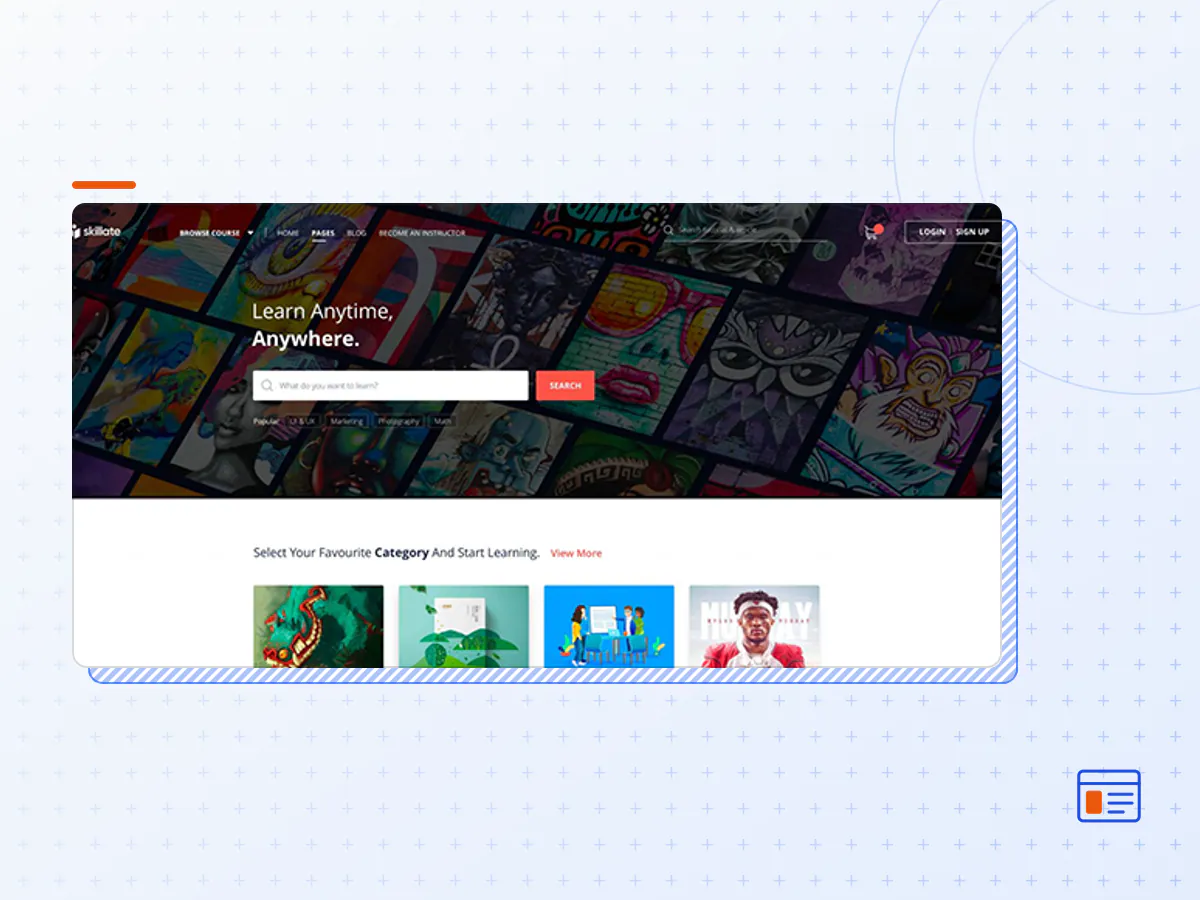
Skillate offers the best in class navigation system to find the courses faster and make the learning process easy. It has a dedicated design for mobile devices which gives an app like feel. More student engagement and better learning experience is guaranteed!
Course Marketplace
Skillate is made with a full-featured eLearning marketplace in mind. Set the tone for an intuitive learning environment with this WordPress LMS Theme.
- Robust & user-friendly LMS features
- Anyone can sign up and share their knowledge
- Simple teacher and student management
- Top-notch monetization and payment system
Mobile Ready User Experience
Use Skillate to create a fully responsive LMS platform minutes! Take the LMS experience to the next level with mobile-ready web pages, app-like UX, and learning-friendly UI.
- Create fast and light webpages
- Enable the students to learn on-the-go
- Native mobile user experience
Multi-instructor Ready
Tap into the power of synergy. Use Skillate to bring multiple educators on your eLearning portal. Tutor LMS provides easy to manage course building with multiple instructors even in single courses.
- Multi-instructor support for your course marketplace
- Offer complete coverage of topics
- Effortless instructor management
- Easy revenue & withdrawal options
Teacher Profiles
Skillate comes with an elegant instructor profile design. These pages create a personal touch with the visitors. It also contains student reviews as well as their other courses.
- Attract new students with instructor profiles
- Showcase reviews and ratings
- Retain students with similar courses
Eye-Catchy Instructor Badges
Use attractive and engaging instructor badges on the instructor bio page. Grab more attention of perusing students on your learning hub!
- Instructor badges recognize excelling teachers
- Create a sense of credibility with students
- Show multiple badges on any particular teacher profile
Modern Search & Navigation
Skillate has a stunning menu design with a mega menu and rich navigation options on the hero sections.
- Creative Home: Live search bar with curated popular tags
- Classic Home: Sleek live search box for simplicity
- Default Home: Category grids followed by trending course grids
Deals Countdown
A countdown section on the landing page can showcase ongoing promotions and discount deals to every visitor.
- Create a sense of urgency for potential buyers
- Add a custom link and CTA button to the banner
Featured Instructors
Give the best performing instructors the exposure they deserve. Showcase their profiles on the homepage with a number of courses, ratings, and names.
- Custom carousel for featured instructors
- Enhance conversion on your marketplace
- Keep the excelling instructors motivated
Modern Blog Design
Create an engaging learning environment using educational blog posts using this WordPress LMS Theme. Keep the students up-to-date with the recent news from your platform.
- Eye-catchy blog landing page design
- Featured posts grid
- Reader-friendly single column blog detail design
- Optimize bounce rates using related posts grid
Search With Language Filters
Go beyond regular listings! Skillate allows users to filter while exploring based on Course Level, Categories, and Topics. Most importantly, language filters will allow visitors to find courses in their language.
- Instant course filtering
- Shows price, ratings and instructor name
- Keep the excelling instructors motivated
- Course sorting
- Language filtering with supported languages
- The Skillate theme package as the developer released it.
- The installable theme .zip, plus whatever else the developer ships with it — often a child theme and documentation.
- GPL licensing: use it on as many sites as you like, for yourself or for clients.
- A year of downloads and newer versions with a single purchase, or permanent access with the lifetime upgrade.
- Also unlocked by every membership plan, together with the rest of the theme catalogue.
Not included
- A licence key from the developer — demo importers or bundled-plugin updates that check a key on the developer's servers may need manual steps.
How to install Skillate
- 1Download Skillate from Downloads in your account.
- 2If the download holds several files, unzip only that outer package and find the installable theme .zip (usually named after the theme).
- 3In WordPress open Appearance → Themes → Add New Theme → Upload Theme, choose that .zip and click Install Now.
- 4Activate the theme. If it recommends companion plugins, install them from the notice it shows.
- 5Optional: import the demo content from the theme's own setup screen, then replace the demo text and images with yours.
Using a child theme keeps your custom CSS and template edits safe when you upload a newer version of the parent theme.
Is Skillate the original theme?
Yes — the package is the developer's release, unmodified, redistributed under the GNU GPL. WordPress GPL sells the download and updates; it does not issue vendor licence keys.
Will the Skillate demo import work?
Usually, yes. Most demo importers run inside WordPress. A few download demo files from the developer's servers and check a licence key first; in that case you can still build the pages yourself with the bundled templates.
How do theme updates work?
When a newer version of Skillate reaches our catalogue it replaces the file in your account. Upload it over the current theme (Appearance → Themes → Add New Theme → Upload Theme) and WordPress replaces it while keeping your settings.
What if the theme doesn't work?
Contact us with your order number. If the file is broken or clearly not what this page describes and we can't fix it, you get a refund within 14 days of purchase.