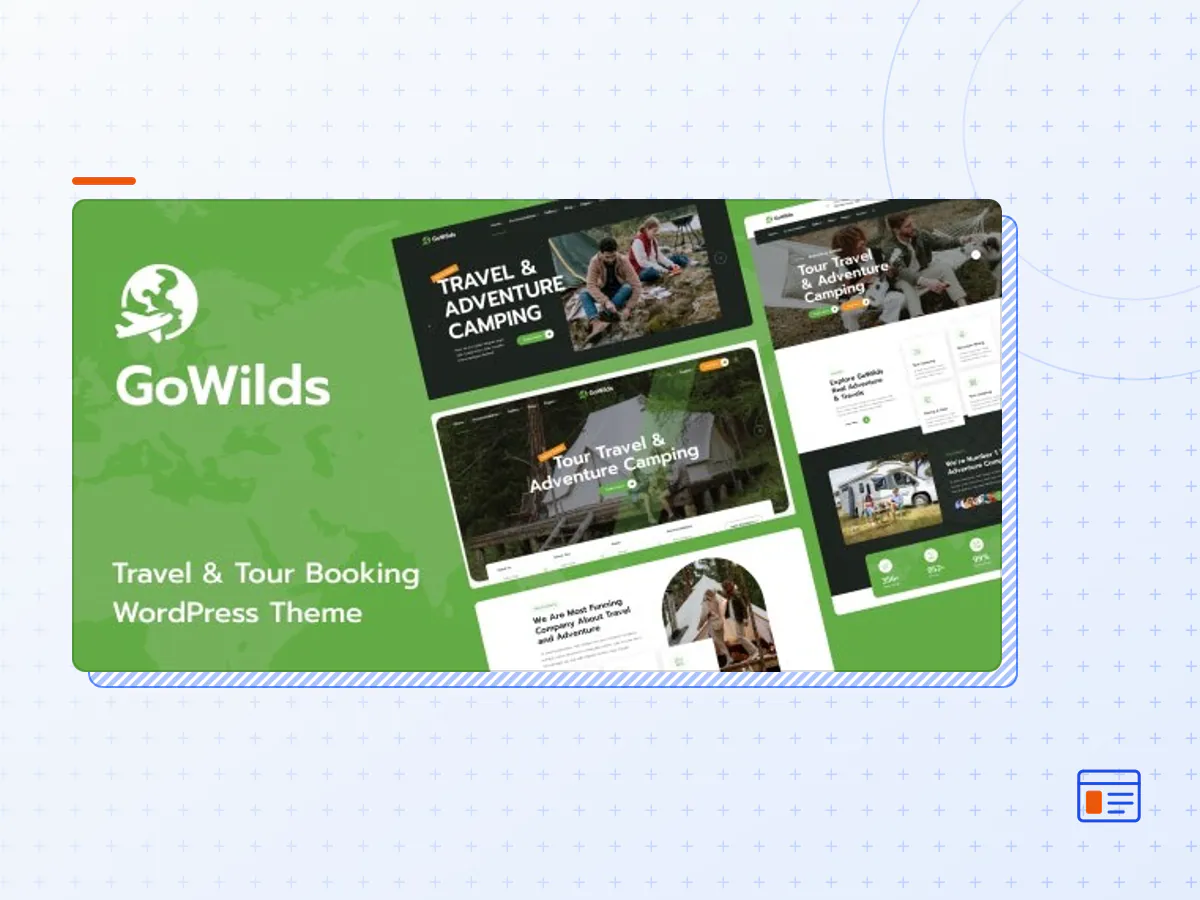
Gowilds - Travel & Tour Booking WordPress Theme
- Type
- Theme
- Licence
- GNU GPL
- Delivery
- Instant download
- Access
- 12 months, or lifetime
- Sites
- Unlimited
Gowilds – Tour Booking WordPress Theme is suitable to showcase your tours in style, offering remarkable pages to display your tours and destinations. It is perfect for travel agencies, tour operators, trip holiday booking websites, booking companies looking for a unique and intuitive search function. This is truly innovative and a complete WordPress theme built for tourism sector and ideal for tour operators and travel agents specialising in day tours, tour packages, vacations, hiking and camping, city tours, cruise packages etc. The theme has its own super powerful theme control panel with lots of useful options and tools to manage your site: Elementor, Revolution Slider, Custom Icon Font, etc. and the theme apply the latest web technologies: Bootstrap 5, SASS, HTML5, CSS3, Font Awesome … Check the demos to see by yourself.
Features
- 4 Home Page Demo.
- Header Builder with Elementor.
- Footer Builder with Elementor.
- Page Layout with Elementor Page Builder.
- Elementor Plugin Integration – Gowilds is based on Elementor Free plugin. Create Any Website You Can Imagine. You can modify: Homepage, all pages (e.g., Contact / About), Layout Single Tour, Layout Archive Tour, Layout Single Blog, Layout Archive Blog Page, Header Layout, Footer Layout. It is the most flexible and easy to use solution on the market for travel Booking website. Our developers created 30+ new elements that you can “drag-and-drop” to make sure page builder is ultra flexible and fully integrated with Gowilds.
- One Click Demo Import – If you want to use some pages of our demo you just need to make one click to have our demo imported
- Travel & Tour Booking.
- Frontend Dashboard Page.
- Calendar & Tour Price.
- Gallery Tour.
- Comment and Rating Tour.
- Cyclic availability: schedule items availability every N days for M days.
- Travel Destination Page Design.
- Google Maps API intergrated to show address map.
- Use Google Fonts or Standard fonts.
- Fully responsive design, 100% Responsive Theme.
- Comes with the Elementor Page Builder, most awesome visual page builder for WordPress.
- Include Amazing Revolution Slider Plugin.
- Parallax Feature and Video Section for any page.
- Child Theme Compatible – includes basic child theme.
- WooCommerce shop setup and products.
- WPML supported.
- Powered by Redux framework, bring to you unlimited color and Google fonts options.
- Fast & Friendly support.
- Full Documentation.
- Powered by HTML5/CSS3/Bootstrap.
- Tested with W3C validator.
- And more…
Third Party Plug-in Integration
- Elementor Page Builder
- BA Book Everything (free version)
- Slider Revolution
- WooCommerce
- Contact Form 7
- MailChimp for WP
BA Book Everything
BA Book Everything plugin – the really fast and powerful Booking engine with management system for theme/site developers to create any booking or rental sites (tours, hotels, hostels, apartments, cars, events etc., or all together).
Gowilds travel booking theme has used it for its tour booking function. Go to the theme demo and check it out now to know how awesome the booking system is. Besides the free Booking Everything plugin, the plugin provider has premium add-ons to enhance the plugin functions.
Elementor Plugin Integration
Gowilds is based on Elementor Free plugin. You can modify: Homepage, all pages (e.g., Contact / About), Footer, Header, Single Tour Page, Archive Tour Page, Single Blog Page, Archive Blog Page Results Page, and more. It is the most flexible and easy to use solution on the market for Travel & Tour Booking website.
Demo Content Included, One-click Demo Import
Install Gowilds with our powerful one click installer. Get your site up and running in no time! Quick, easy and rocket fast!
Google Fonts
Choose any of the Google web fonts library through powerful Real-time Customizer panel!
Child theme compatible
Gowilds enables you to easily override default template files using a child theme. It also enables you updating your theme in the safe way!
Detailed documentation
Extensive documentation plus great video guides on how to setup and customize of theme will make your customizations super easy and fast!
- The Gowilds theme package as the developer released it.
- The installable theme .zip, plus whatever else the developer ships with it — often a child theme and documentation.
- GPL licensing: use it on as many sites as you like, for yourself or for clients.
- A year of downloads and newer versions with a single purchase, or permanent access with the lifetime upgrade.
- Also unlocked by every membership plan, together with the rest of the theme catalogue.
Not included
- A licence key from the developer — demo importers or bundled-plugin updates that check a key on the developer's servers may need manual steps.
How to install Gowilds
- 1Download Gowilds from Downloads in your account.
- 2If the download holds several files, unzip only that outer package and find the installable theme .zip (usually named after the theme).
- 3In WordPress open Appearance → Themes → Add New Theme → Upload Theme, choose that .zip and click Install Now.
- 4Activate the theme. If it recommends companion plugins, install them from the notice it shows.
- 5Optional: import the demo content from the theme's own setup screen, then replace the demo text and images with yours.
Using a child theme keeps your custom CSS and template edits safe when you upload a newer version of the parent theme.
Is Gowilds the original theme?
Yes — the package is the developer's release, unmodified, redistributed under the GNU GPL. WordPress GPL sells the download and updates; it does not issue vendor licence keys.
Will the Gowilds demo import work?
Usually, yes. Most demo importers run inside WordPress. A few download demo files from the developer's servers and check a licence key first; in that case you can still build the pages yourself with the bundled templates.
How do theme updates work?
When a newer version of Gowilds reaches our catalogue it replaces the file in your account. Upload it over the current theme (Appearance → Themes → Add New Theme → Upload Theme) and WordPress replaces it while keeping your settings.
What if the theme doesn't work?
Contact us with your order number. If the file is broken or clearly not what this page describes and we can't fix it, you get a refund within 14 days of purchase.