Atlas - Creative Blog & News WordPress Theme
- Type
- Theme
- Licence
- GNU GPL
- Delivery
- Instant download
- Access
- 12 months, or lifetime
- Sites
- Unlimited
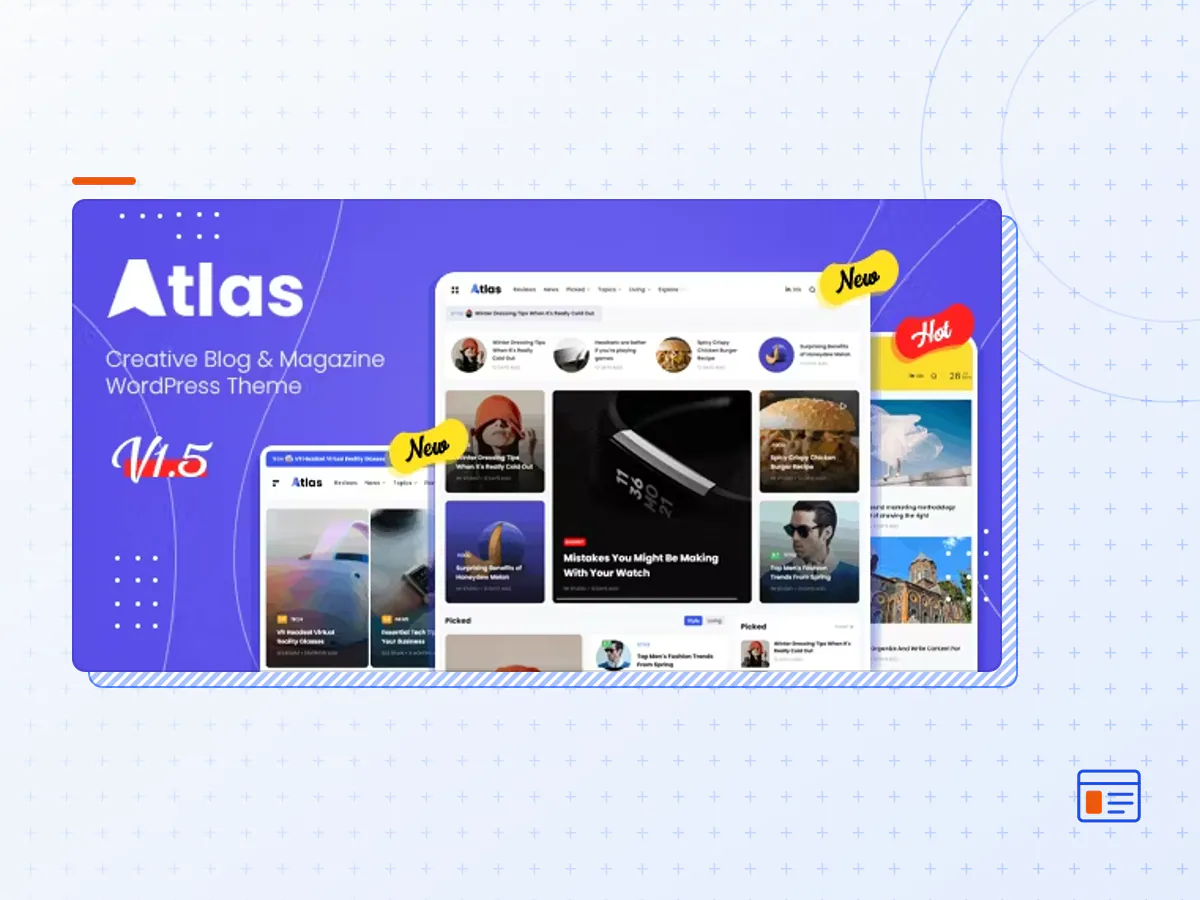
Atlas is a WordPress theme with a compact and modern design. With a tight structure, the elements will be neatly arranged perfectly and make it easier for visitors to see all the content you provide.
Built with the popular page builder Elementor, where you can create the design you want. You can create headers, footers and content on each front page. However, we have provided prebuild demos that are ready to use to speed up your work, with just one click your website is ready.
Even though it was created using Elementor, we made this theme still fast by providing acceleration options. We minimize every code without throwing away existing features.
It’s time for you to switch to Atlas
ATLAS FEATURES
- One-Click Demos Install
- Clean, Modern, & Minimalist Design
- Fully Responsive
- Support AMP
- Drag & Drop Elementor Page Builder
- 100% RTL Support
- Lazy Load & Lazy Size Images
- Dark & Light Skins with Custom Colors
- Megamenu with Elementor Builder
- Ajax Category Megamenu
- Support All Google Fonts
- Unlimited Colors
- SVG logo & icons
- Retina Ready
- Translation Ready
- Contact 7 Compatible
- Mailchimp Compatible
- Sticky Sidebar
- Sticky Header/Navigation Menu
- Easy-To-Use & Lightweight Theme Options
- 5 Articles Layouts
- Infinite Scroll Load Next Posts/Articles
- Now Reading for Single Posts
- Social Shares Ready
- Reading Article Indicator
- Rich Snippet & Opengraph Ready
- Grids & Masonry Blog Layout
- Search Ajax & Popup
- OffCanvas Menu & Sidebar Ready
- Speed Optimization Settings
- SEO Ready
- Fully compatible with WooCommerce
- Free Lifetime Updates
- Dedicated support
- And Much More …
- The Atlas theme package as the developer released it.
- The installable theme .zip, plus whatever else the developer ships with it — often a child theme and documentation.
- GPL licensing: use it on as many sites as you like, for yourself or for clients.
- A year of downloads and newer versions with a single purchase, or permanent access with the lifetime upgrade.
- Also unlocked by every membership plan, together with the rest of the theme catalogue.
Not included
- A licence key from the developer — demo importers or bundled-plugin updates that check a key on the developer's servers may need manual steps.
How to install Atlas
- 1Download Atlas from Downloads in your account.
- 2If the download holds several files, unzip only that outer package and find the installable theme .zip (usually named after the theme).
- 3In WordPress open Appearance → Themes → Add New Theme → Upload Theme, choose that .zip and click Install Now.
- 4Activate the theme. If it recommends companion plugins, install them from the notice it shows.
- 5Optional: import the demo content from the theme's own setup screen, then replace the demo text and images with yours.
Using a child theme keeps your custom CSS and template edits safe when you upload a newer version of the parent theme.
Is Atlas the original theme?
Yes — the package is the developer's release, unmodified, redistributed under the GNU GPL. WordPress GPL sells the download and updates; it does not issue vendor licence keys.
Will the Atlas demo import work?
Usually, yes. Most demo importers run inside WordPress. A few download demo files from the developer's servers and check a licence key first; in that case you can still build the pages yourself with the bundled templates.
How do theme updates work?
When a newer version of Atlas reaches our catalogue it replaces the file in your account. Upload it over the current theme (Appearance → Themes → Add New Theme → Upload Theme) and WordPress replaces it while keeping your settings.
What if the theme doesn't work?
Contact us with your order number. If the file is broken or clearly not what this page describes and we can't fix it, you get a refund within 14 days of purchase.